Error in deploying all projects with this:
error in createBuildConfig: error in validateSignedURLBuildConfig: build config is missing required build step fetch
There seems to be a breaking error that Firebase Team introduced and did not communicate.
Error in deploying all projects with this:
error in createBuildConfig: error in validateSignedURLBuildConfig: build config is missing required build step fetch
There seems to be a breaking error that Firebase Team introduced and did not communicate.
same here too, i’ve been battling with this too, i think this has to be an issue from firebase, the error doesnt give build up errors . this sucks
Same issue as well. Across two different projects. Was able to build both around 2 PM ET today, and then both started showing this error around 3 PM ET. Folks are reporting the same issue on the /firebase sub-reddit.
Imagine you are about to plug a major security hole that will bankrupt your organization. And you don’t have a way to do it.
Firebase Team doesn’t even tell people “Hey, we are aware something is wrong. We’re fixing it.” NOTHING.
Have you seen any from them? They don’t seem to care.
Same issue here across different projects and even different accounts.
I’m also facing the same issue since 1.30pm IST for deploying a perfectly working app
Iam also fetching same error in createBuildConfig: error in validateSignedURLBuildConfig: build config is missing required build step fetch
Same here.
My last deployment still works, but I can’t re-deploy.
same for me. I try to rededploy an old project without any update and it’s the same error
Wake up Google and give everyone an update. Some of us are paying customers.
I almost broke my whole app trying to get that fix, I should have checked in here first.
I copy/pasted the error text into the prototyper chat. it correctly stated that it was a firebase issue and not something wrong with the app itself.
Got this from support. I am trying in a second App Hosting backend first, though:
After an investigation I can see that this is a known issue already reported with the engineering team, at this time the workaround is to publish the application manually using App Hosting, since the engineering team is working on a quick fix for this, I’ll report that you are facing this issue.
In the meantime could you please try this workaround:
Open a new terminal, you can go to the left up (on coding view) where there is an icon with 3 little lines → Terminal→New terminal, that will give you access to the workspace’s terminal where you will be able to run commands, then execute the following commands:
1. firebase init apphosting
2. npm run build
3. firebase deploy --only apphosting
Keep in mind that you will need to replace the existing apphosting.yaml file. After replacing the file, you will be prompted with a question asking you to “Specify your app’s root directory relative to your firebase.json directory (/)”. Simply press Enter to accept the default root director
y
Let me know the result please, when I tried doing the firebase deploy it worked but it got deploy on hosting not app hosting. It also broke my web app on the environment preview. And gave me around 10,000 commits. Thanks
hey Liga_do_Bem, you need to let them know for us that you aren’t alone. ask them to visit this forum once in a while.
After a long debug with Claude Sonnet, I finally can say… it worked… but… via FB Studio deploy, I didn’t need apphosting.yaml with my environment variables and the app used the local file firebase-admin-sdk-key.json which is not in git repositories and what resulted in a silent fail. Claude helped me identify and refactor the file:
// lib/firebase/admin.ts

import admin from 'firebase-admin';


let adminDb: admin.firestore.Firestore | null = null;


/**

 * Initializes the Firebase Admin SDK using Application Default Credentials.

 * No service account file needed in Firebase App Hosting!

 */

function initializeAdmin() {

  if (admin.apps.length > 0) {

    console.log('Firebase Admin SDK already initialized.');

    adminDb = admin.firestore();

    return;

  }


  try {

    // ✅ No Firebase App Hosting, use Application Default Credentials

    admin.initializeApp({

      projectId: process.env.NEXT_PUBLIC_FIREBASE_PROJECT_ID,

    });


    adminDb = admin.firestore();

    console.log('✅ Firebase Admin SDK initialized with Application Default Credentials');

  } catch (error: any) {

    console.error('❌ Failed to initialize Firebase Admin SDK:', error);

    throw new Error('Failed to initialize Firebase Admin SDK');

  }

}


/**

 * Gets a Firestore Admin instance.

 */

export async function getAdminDb(): Promise<admin.firestore.Firestore> {

  if (!adminDb) {

    initializeAdmin();

  }


  if (!adminDb) {

    throw new Error('Admin DB not available after initialization');

  }


  return adminDb;

}
Did you use the terminal with the commands that support provided?
I did not. Instead, I duplicated my main branch on github, created a new backend in App Hosting synced to that branch for deployment. Then, in FB Studi I checkout to the new branch and made my changes there. When I commit, a new build is made in Firebase App Hosting. I have now a second URL to my app.
Right now I am deciding between: 1. redirect my custom domain to the new URL OR 2. pull request that new branch to main and use those commands or do it via Firebase Console App Hosting (as I did before)
I was stuck with this problem for the last two days until I read the contribution from @Liga_do_Bem. By following the instructions that support gave them, I was able to solve the error: ‘Deploy error in createBuildConfig: error in validateSignedURLBuildConfig: build config is missing required build step fetch’.
The first thing I did was delete the apphosting.yaml file, then I followed the steps: Menu (three-line icon) > Terminal > New Terminal.
From here, I only had to run the first command: firebase init apphosting
Selected: Link to an existing backend
Selected: My app’s current backend
For “Specify your app’s root directory relative to your firebase.json directory /”, I just pressed Enter
When finished, it stated: Firebase initialization complete!
After this process, I was able to publish successfully. I hope this helps you all, considering it’s a problem many of us are having.
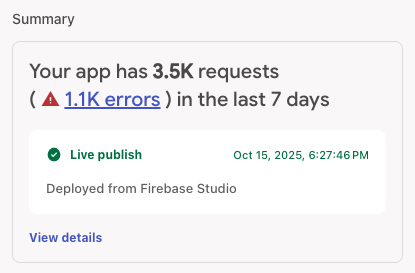

 it works , just published my app now