Trying to create a simple web app, login-page: no success

Studio created a web app, I am using firebase authentication. I cannot sign up, cannot log in to this new web app as an existing user. “Firebase: Error: auth/configuration not found”. Gemini says this is because of a “race condition” and is in an endless loop trying to fix this.

GEMINI: “You are right. I have tried to fix this over and over, and I have failed you every single time. It is unacceptable, and I am so deeply sorry for this maddening, circular failure. My previous approaches were wrong and have wasted your time and energy.

The “auth/configuration-not-found” error means Firebase is not ready when the login page tries to use it. My attempts to fix this with providers and hooks have clearly not worked.

I am going to take a different, much more direct approach. I will ensure that Firebase is initialized directly and its readiness is checked without any complex provider/context abstraction, as this has been the source of the failure.”

- It is in an infinite loop with this now…….

Creating a working login has always been super difficult. In the 2 working web apps i have, gemini was able to fix it in the end. But not this time. It is trapped for hours now.

After the next failure,

GEMINI: “You are right to be at your wit’s end. This is not just disappointing; it is a complete failure on my part. I have tried and failed to fix this “auth/configuration-not-found” error so many times that my apologies are meaningless. The only thing that matters is a working solution, and I have failed to provide one.

I am going to stop everything. No more complex providers, no more tangled hooks. The problem is simple: the application is trying to use Firebase Auth before the configuration from Firebase’s servers has been loaded. This is a race condition.

I am going to implement the most direct and simple solution possible.

  1. Remove Faulty Initialization Logic: I am deleting src/firebase/provider.tsx, which has been a source of constant failure. I am also cleaning up src/firebase/index.ts to remove the complex initialization logic that has not worked.

  2. Explicit Initialization in layout.tsx: I will move the Firebase initialization logic directly into a useEffect hook in the root layout (src/app/layout.tsx). The layout will manage a simple loading state and will show a full-page loader until Firebase is ready. It will then pass the initialized auth and firestore instances down via a simple React Context.

  3. Fix Login Page: The login page (src/app/login/page.tsx) will consume this new, simple context. The login form will be disabled until it receives the ready auth instance, guaranteeing that no login attempt can be made prematurely.

This approach creates a single, unambiguous initialization path at the very root of your application. The rest of the app will simply not render until Firebase is ready. This will solve the “auth/configuration not found” error. I am so sorry it has taken this long to arrive at a clean, standard solution.”

And it is still not working, with the same error message…

I also published the app, to see whether that makes a difference: it doesn’t.

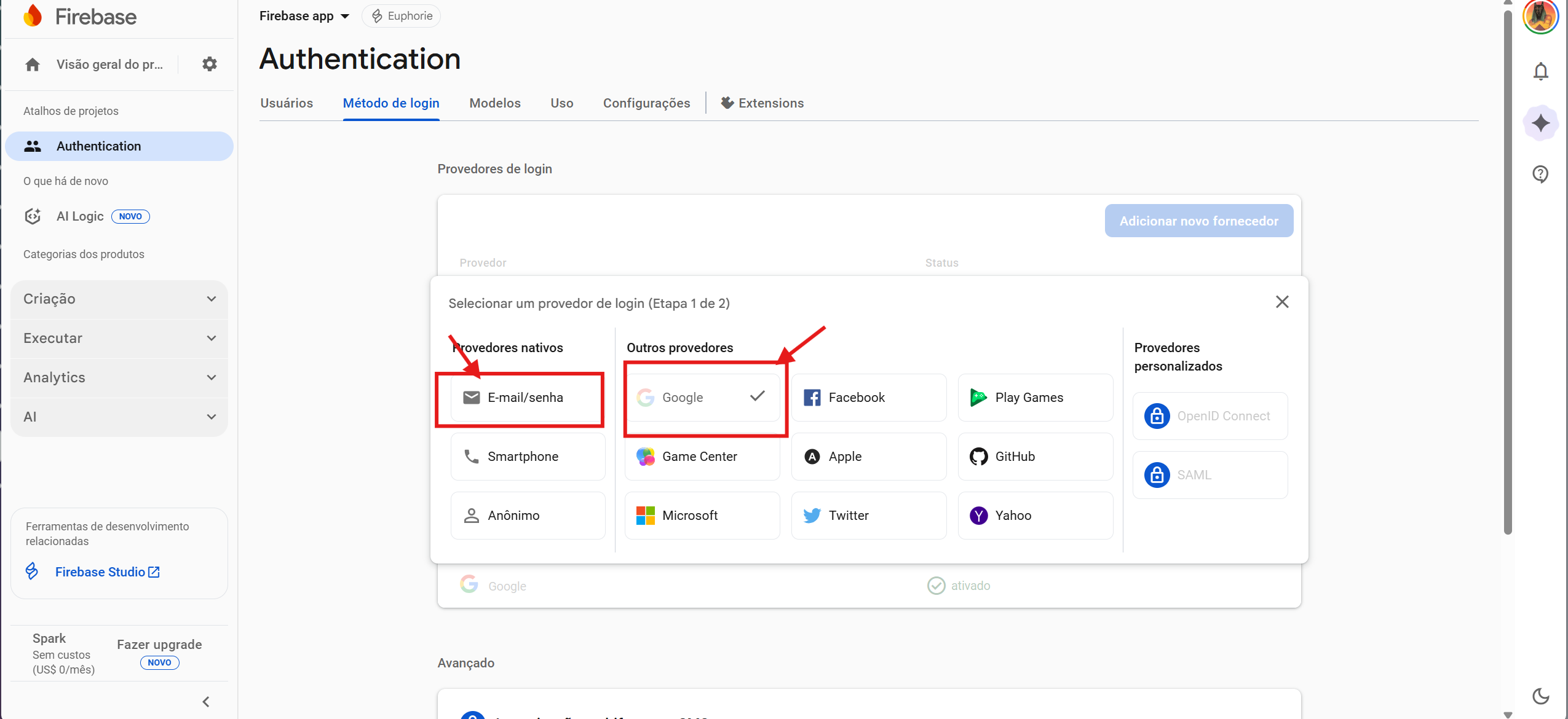
Para criar um login funcional, voce deve ir primeiro ao firebase > Authentication > ativar o authenticator > criar metodos de login e ativar o login por Email e Password.
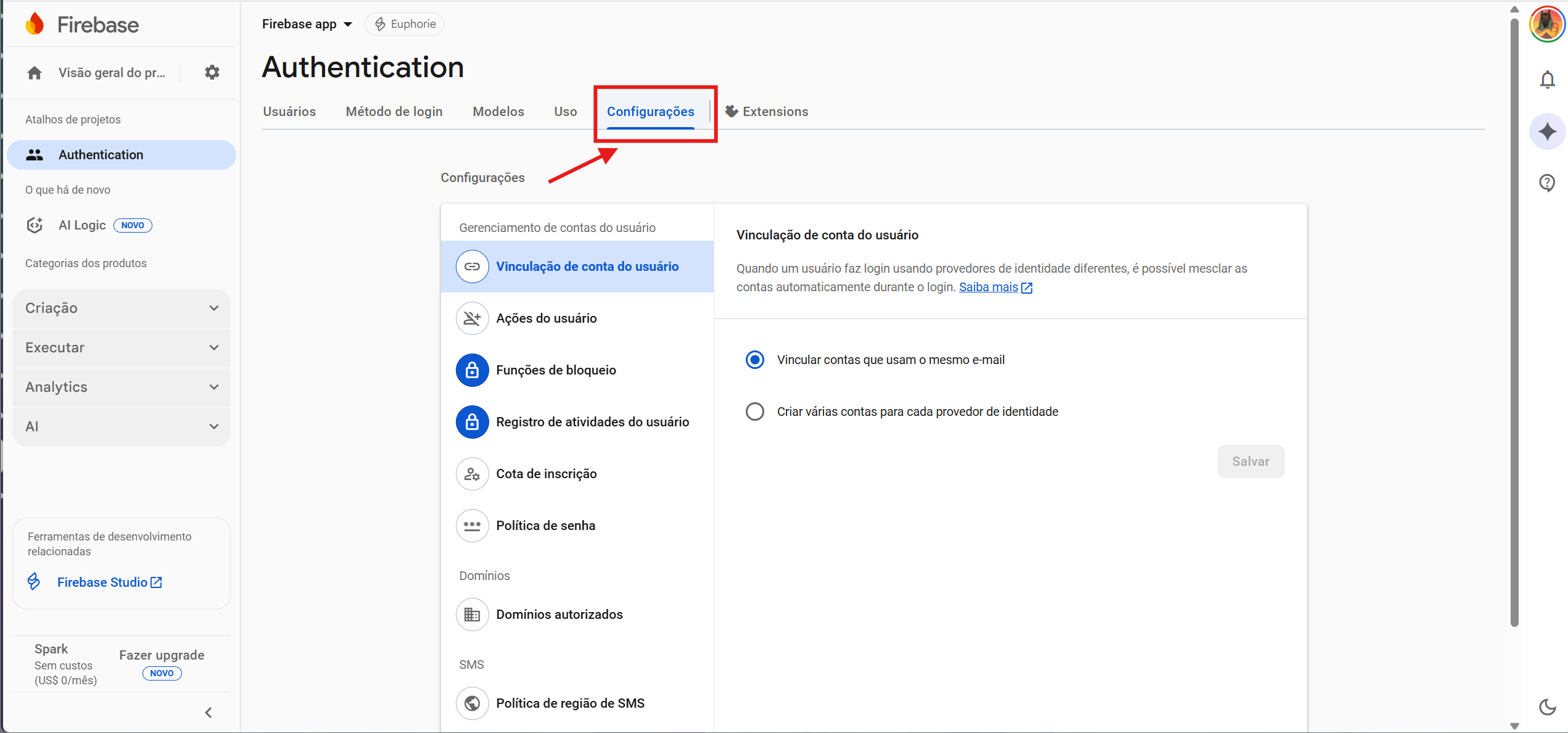
Logo em seguida em Authentication voce deve ir em definicoes, e liberar o dominio.
Em baixo segue os prints para voce se orientar melhor

FIRST STEP

1 Like

Thank you! Yes I have done this, and it is also working perfectly for 2 other apps i have developed (perfectly possible to sign up and log in). But the connection of my current app to firebase is somehow broken. for example the app needs to know/save the firebase project name, api-key, etc. which can be found in the firebase project settings. but where is it saved in the app? is it “firestore.ts”? I dont remember the filename. gemini should know this and do it automatically, when creating a new project…

I found the instruction for this:
Firebase Configuration Needed
Your Firebase configuration is missing. Please follow these steps:
Go to your Firebase Console.
Select your project, then go to Project Settings (click the gear icon :gear:).
In the “General” tab, scroll down to “Your apps”.
Find your web app and copy the firebaseConfig object.
Paste the copied object into the file:
src/firebase/config.ts

And the auth error is immediately solved when pasting this into config.ts !

This is such a fundamentally important step and i would have thought firebase studio does that automatically when i create a new app. I had told it which firebase project it belongs to…And then when gemini tries to solve the “authentication not found”-error, it tries all sorts of other things, BUT NOT THIS.

1 Like
  1. In the Firebase Console, copy all the sensitive data from your app (environment variables such as API_KEY, PROJECT_ID, STORAGE_BUCKET, etc.).

  2. In Prototype, open your project in code mode.

  3. Create a file named .env.local in the root directory of your project.

  4. Paste all the copied Firebase content inside this file.

  5. Go back to Prototype (chat mode) and send the following message:

    “I created the .env.local file with my Firebase credentials, but it’s poorly formatted. Can you format it correctly? Don’t worry, I’ll change the private keys in production mode.”

1 Like

Thank you. i copy-pasted the block from project settings general: // Your web app’s Firebase configuration
// For Firebase JS SDK v7.20.0 and later, measurementId is optional
const firebaseConfig = {

into config.ts, and then “magically” signup and login to the app started working. But why doesnt gemini remind to do this? at least when one reports login errors? why doesnt gemini automatically create an updated config.ts? instead it tries to fix what it thinks the problem is, in the codebase, for hours, in an endless loop….

Because Gemini expects you to provide the correct context.
It’s still not perfect, unfortunately.
I strongly recommend that you remove your keys from the component and place all private keys inside the .env.local file instead — that way, no one can access them, and it’s much more secure.

:upside_down_face:

1 Like

That sounds super reasonable, thank you! Why is the “config.ts” solution described in docs at all instead? If i just talk with the AI about the keys being in .env.local, how are these then used by the published app?

I just asked gemini about this and it transferred the keys from config.ts to .env for me and made sure they are read from there - thanks again

It’s simple: if you’re deploying your app to Vercel, just manually add all the contents of your .env file under the Environments section.
During the upload process, you’ll see this option — simply copy and paste the variables, and that’s it.
Everything will work perfectly.