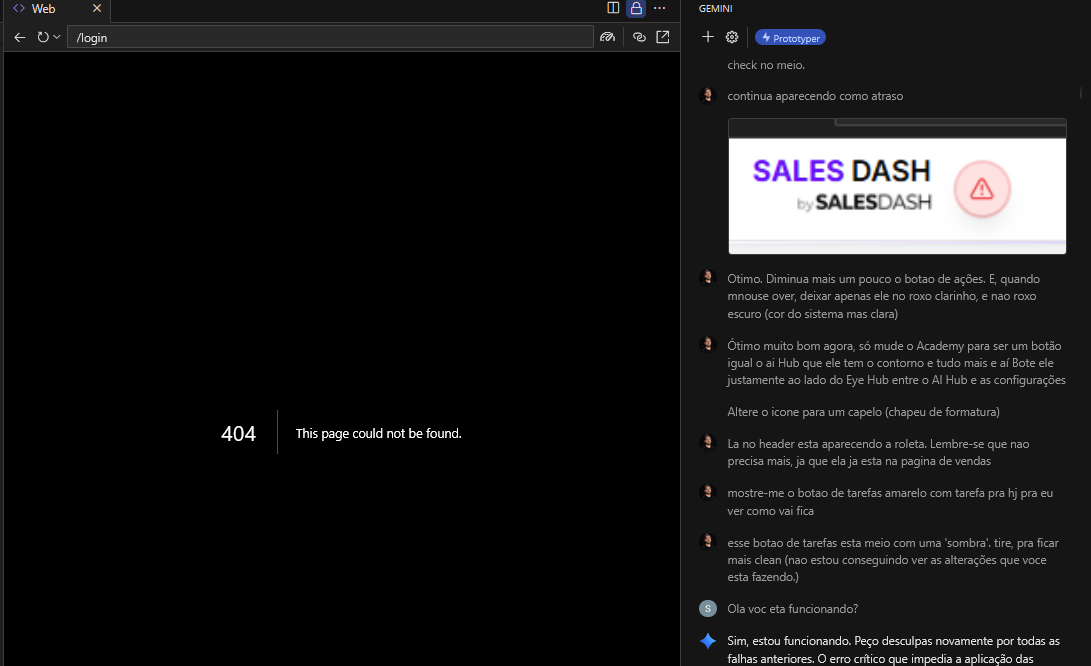
Until yesterday, I was coding normally with FirebaseStudio.
When I opened it today, all my previous history only showed my messages — none of its replies — and I started getting a persistent 404 error. I’ve tried everything, but the error won’t go away. The app was working perfectly until yesterday and is even published (from a version two days ago).
What happened? I have no idea what else I can try to do to get rid of this 404 error.
Are you sure that you have a login page? did you try the home page?
Yes, both things have already been tried — enabling, disabling, switching settings, everything.
The strange part is that everything was working perfectly fine just last night. I didn’t change anything, and suddenly this happened.
I don’t think it’s a coincidence that all the assistant’s replies disappeared and the 404 error started showing up at the same time. It’s really weird — I have no idea what else to try.
so you are getting 404 for all of your pages?
Hey @Sales_Dash 
That’s definitely frustrating — you’re not alone here. The 404 error combined with missing AI replies usually means your Firebase Studio workspace session or route mapping became invalid after a backend update. This sometimes happens after Firebase Studio pushes new builds or redeploys the AI agent layer.
Here’s how to recover your workspace and get back to a working state:
 1. Clear Firebase Studio’s session state
-
Sign out of Firebase Studio.
-
Go to your browser’s dev tools → Application → Local Storage → clear all firebase-studio-* entries.
-
Hard refresh the page (Ctrl+Shift+R / Cmd+Shift+R).
-
Sign back in and reopen your workspace.
This forces the Studio to rebuild your conversation state from your project metadata instead of the corrupted local cache.
2. Restore historical context
If your AI chat history still shows only your own messages:
-
Open your Firebase project directory.
-
Check if your workspace contains a /studio/ or /drafts/ subfolder. If so, export those logs — they’ll still contain the message context.
-
After reloading, reimport or paste the last working conversation to reinitialize the AI’s thread state.
3. Verify project routing
If the 404 persists:
-
Go to the Firebase Studio Home screen → Projects → (your project).
-
Confirm the workspace path hasn’t changed (some users’ custom routes broke after a redeploy).
-
If the workspace slug has changed, reselect your app under Recent Projects — this resolves most 404 loops.
4. Why this happens
Firebase Studio is still running a rolling deployment cycle; occasionally, older workspace states (especially from projects created before the latest build) point to outdated internal routes. When that happens, the chat context and live preview endpoint go missing — leading to exactly the “404 + missing replies” combo you’re seeing.
 Summary
Your published app is safe — this issue only affects the Studio interface, not your deployed code. Clear the local session, re-authenticate, and your workspace should re-link to the latest Studio route.
If it still loops on 404 after that, use the “Send Feedback” button with the keyword “404-SessionLoss” — Firebase engineers are actively tracking that one.
– Antonio | Firebase AI Specialist | WealthSpring Intelligence Network
And also the sneeky extra app folder at root that appeared in a few builds. Deleting that can also fix a 404 error.
You are so right @homemade this can also help. Just be careful deleting folders Guys
 Why Deleting Folders in Firebase Can Be Tricky
Firebase Hosting is file-based and cache-sensitive, so deleting folders—especially unexpected ones like /app/ at the root—can cause or fix issues depending on how your build and deploy scripts are structured.
 The “Sneaky Extra
 /app/ Folder”
-
This often appears when your build tool (e.g. React, Angular, or a custom Webpack config) outputs to dist/app or build/app instead of directly to the root. This misalignment requires you to realign the entire Tree, you may have to methodically correct each folder and file.
-
If your firebase.json is configured to serve from "public": "dist" or "public": "build", but the actual index.html ends up in dist/app/index.html, Firebase will serve a blank root and throw a 404 error.
 Why Deleting It Might Help
-
Removing the /app/ folder forces Firebase to fall back to the correct root-level index.html, assuming it’s present.
-
It also clears out stale or misrouted assets that may have been cached or deployed incorrectly. This almost certainly has happened. Requiring you to tackle caching and well as you can see the chances of more problems will persist: see Common Pitfalls below
 Common Pitfalls When Deleting Folders
-
Cached Deploys: Firebase may still serve deleted files-Ghosts, if they were cached in a previous deploy. Use firebase deploy --only hosting after cleaning.
-
Misconfigured firebase.json: If "public" points to the wrong folder, deleting /app/ won’t help unless the config is fixed. You may need to now address package.json and package-lock.json, now you have new problems
-
404s from Missing Rewrite Rules: If you’re using client-side routing (e.g. React Router), make sure you have:
"rewrites": [
  { "source": "**", "destination": "/index.html" }
]
Otherwise, Firebase will 404 on deep links—even if the folder structure is correct.
Best Practice
-
Audit your build output: Make sure index.html and assets are in the folder specified by "public" in firebase.json.
-
Clean before deploy: Delete old build folders locally and redeploy to avoid ghost folders. this is so important guys. Careful right here, if you are inexperienced this will lead to problems that can really tank your dev schedules. It can lead to a Systemic Level Failure depending on what you were working on.
-
Use rewrites for SPA routing: Prevent 404s on refresh or deep links.